Race-Ready Live Streaming Kit
While the MyRaces.Live streaming services work with any live-streaming gear, we know firsthand how tough it can be to find a setup that’s reliable, easy to use, and doesn't require a professional-racing-team budget.
Over the past two years, we’ve tested all kinds of equipment, so you don’t have to. After lots of trial, error, and trackside tinkering, we landed on the perfect kit for racing teams.
Why we love it:
It’s an all-in-one solution that’s simple to configure, race-tested, reliable, and budget-friendly.
Check out the kits we use and trust—available right here.
—The MyRaces.Live Team

>> Click here to order
What's included in the kit?

The MineA5 streaming camera with external antennas
All-in-one live streaming solution!
-
Thanks to its 4G LTE nano SIM Card slots, buying and mounting an extra router/hotspot becomes optional.
-
It supports both RTMP with H.264 and SRT with H.265 (for more video/audio compression).
Boosted Cell Signal Reception
-
External 4G Antenna for each sim card
-
Option to include a rooftop antenna (magnetic or permanent mount)
Streaming over WiFi
-
Already have an external WiFi hotspot in the car? The camera also supports streaming over WiFi!
Continuous Live Streaming
-
If the live stream disconnects, it will automatically retry to live stream without human intervention.
Easy to configure
-
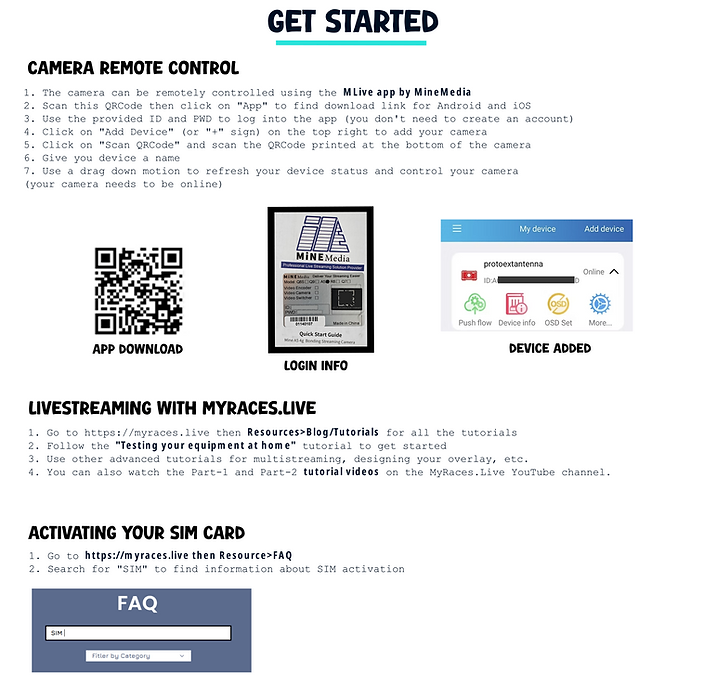
Configure your live stream destination one time using the touch screen or the phone app, then set the camera to start streaming when powered on.
Remote control while the car is on track
-
The car is already on track and you want to adjust the audio or video settings of the stream? You can use the Mine Media MLive phone app to remotely connect to the camera and update any settings you'd like while the car is on track!
Redundancy
-
You can livestream and record your video to an SD card at the same time so you don't lose one bit of your race.
Auto-Streaming:
-
Automatically start streaming when turned on.
LATEST FEATURES
Wi-Fi Hotspot
-
Can now act as a Wi-Fi hotspot for other devices in the car (in-car telemetry streaming, secondary camera, smart watches, etc).
Auto-recording
-
Can now automatically start recording to SD card when turned on.
What else is included in the kits?
Our kits include everything needed for mounting the camera onto a roll bar, plus an external Lavalier microphone with a 5ft cable and foam cover that you can position away from the wind to better capture your car's engine sound.

What is not included?
You'll need to purchase a nano-sized SIM card and a data plan subscription from your preferred service provider. The SIM card can be directly inserted into the MINE A5 4G slot.
NOTE: Ensure your data provider allows SIM card transfers to other devices after activation. You can use your personal phone to activate the SIM card then transfer it to the MineA5.
Some teams prefer to use an e-SIM/SIM in a dedicated hotspot, this is not included in this kit and must be purchased separately.
If you need a Verizon SIM Card, we can optionally ship one as part of the kit. You can then set up a data plan subscription with Verizon by going to their store or calling our Verizon partner/reseller Eric Kaul (the less frustrating option).

What to look for when choosing your data plan?
Validated Service Providers
-
List of Service Providers we have tested with the MineA5:
-
USA: Verizon, AT&T, T-Mobile
-
Australia: Telstra
-
Belgium: Spectrum, Proximus
-
Brazil: Claro
-
Not Supported: Bell Canada and Telus Canada do not recognize the MineA5 IMEI and do not allow transferring SIM Cards to other devices.
Mobile Data plan
-
Unlimited data is typically preferred for live streaming to avoid interruptions, especially during longer sessions.
-
If you want to buy a limited data plan, you can use this simplified math: count 1.2GB of data for each hour of streaming.
-
Understanding whether your data is prioritized (i.e., gets slowed down during network congestion) is also important, as it can impact the quality and reliability of your stream at big events.
Do NOT try to use prepaid cards; the data service provided with prepaid cards is generally not good enough for live streaming (not prioritized and throttled).
Service Provider Coverage at Specific Racetracks
Make sure the tracks you plan to race at have good network coverage with your preferred provider.
Installing the Kit in your car

Getting started
With live streaming